Connecting to Punjab SBA School Workspace…
School Cloud Workspace & Result Card Studio
The multi-teacher examination platform for Punjab Government, PEF, and Private Schools. Enter marks collaboratively, compute positions automatically, and batch-print official cards.
Built for Real School Workflows
Engineered to save teachers hours of repetitive manual paperwork and eliminate printing errors.
Multi-Teacher Live Sync
Urdu, Math, Science, and English teachers enter marks simultaneously from phones or PCs with cell-level autosave and zero overwrites.
1-Click SIS & Excel Ingestion
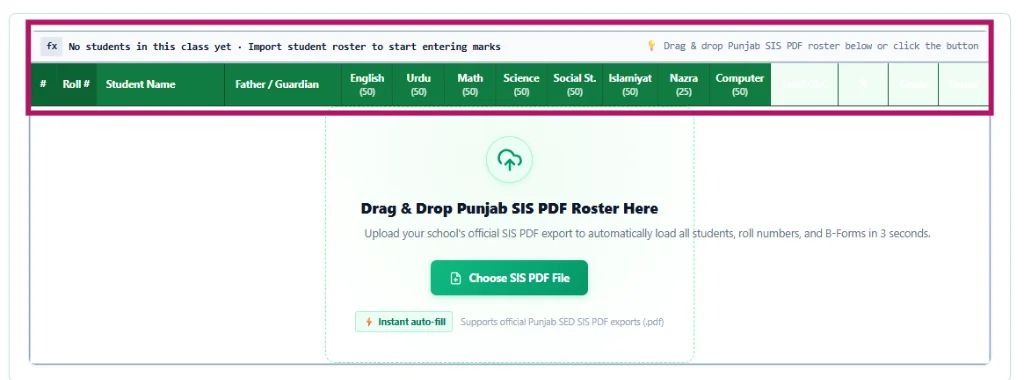
Drop Punjab SIS PDF rosters (Govt) or Excel/CSV spreadsheets (Private) to load 40+ students in 3 seconds flat.
2-Up Paper-Saver Batch Printing
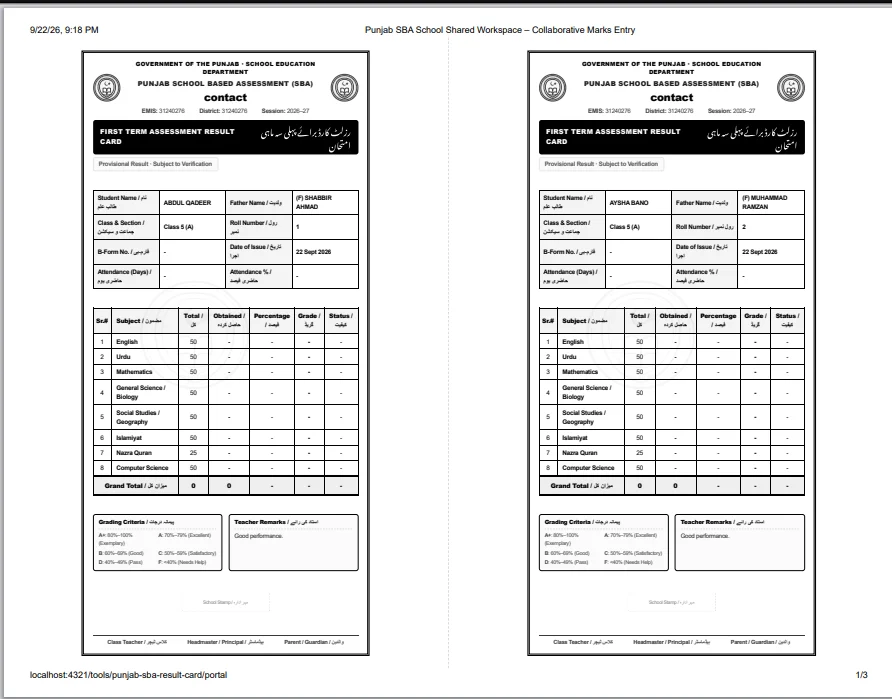
Print 2 official SBA report cards side-by-side on A4 with center cutting guides to cut paper and toner expenses by 50%.
How It Works in 3 Simple Steps
From school registration to printed result cards in under 10 minutes.
Connect Your School
Log in with 8-digit EMIS code (Govt) or mobile number (Private) with your 4-digit passcode.
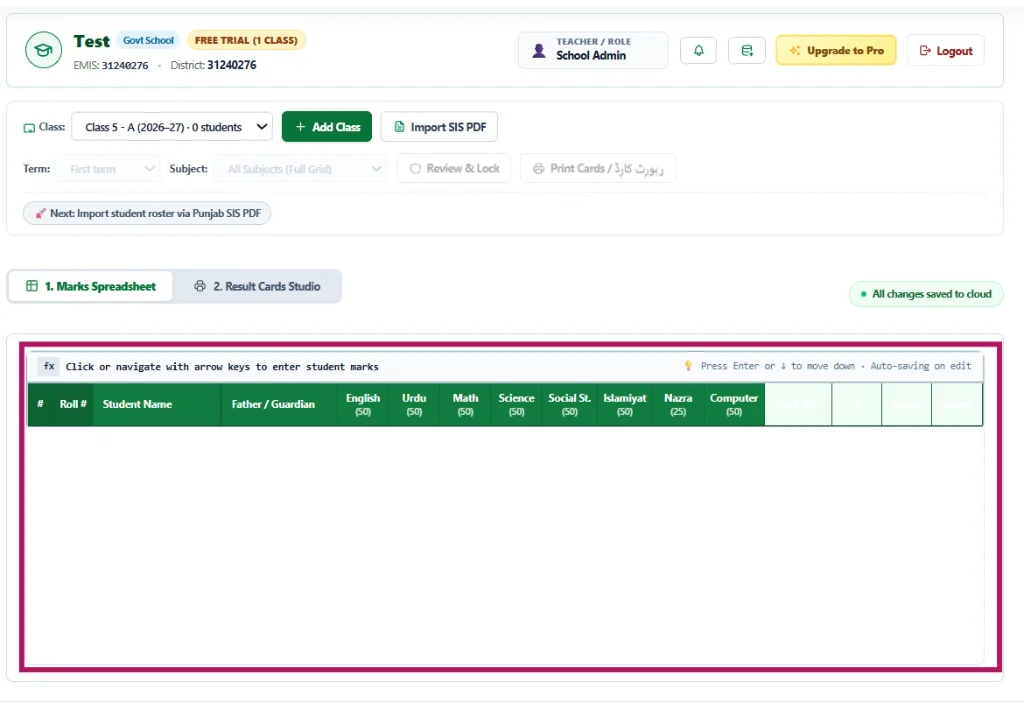
Import Roster & Enter Marks
Drop your SIS PDF or Excel roster to auto-fill students, then subject teachers enter marks in the grid.
Lock Term & Batch Print
Audit missing marks with 1 click, freeze the exam term, and generate ready-to-distribute PDF result cards.
Frequently Asked Questions
Common questions from school heads and teachers.
Is the School Portal free for schools?
Yes! Every school receives full access to class creation, SIS PDF and Excel roster imports, live collaborative marks entry, and single-card printing on our free starter plan.
Can teachers enter marks from their mobile phones?
Yes. The portal is 100% mobile-optimized. Teachers can open the portal on Chrome or Safari on their Android or iPhone, select their class, and enter marks directly during assessment duty.
How do Private Schools import their student rosters?
Private schools simply click "Import Excel Roster" in Step 1. You can upload any standard Excel (.xlsx) or CSV file with student names and roll numbers, or download our ready-made template.
How does the 2-Up Paper-Saver print mode work?
When printing result cards in Step 3, choose the "2-Up Half Page" orientation. The portal automatically formats two complete student cards side-by-side on each A4 page with cutting guides, saving half your paper and printing toner.
Explore Product Tour & Full System Capabilities Click to view preview
See How It Works in Practice
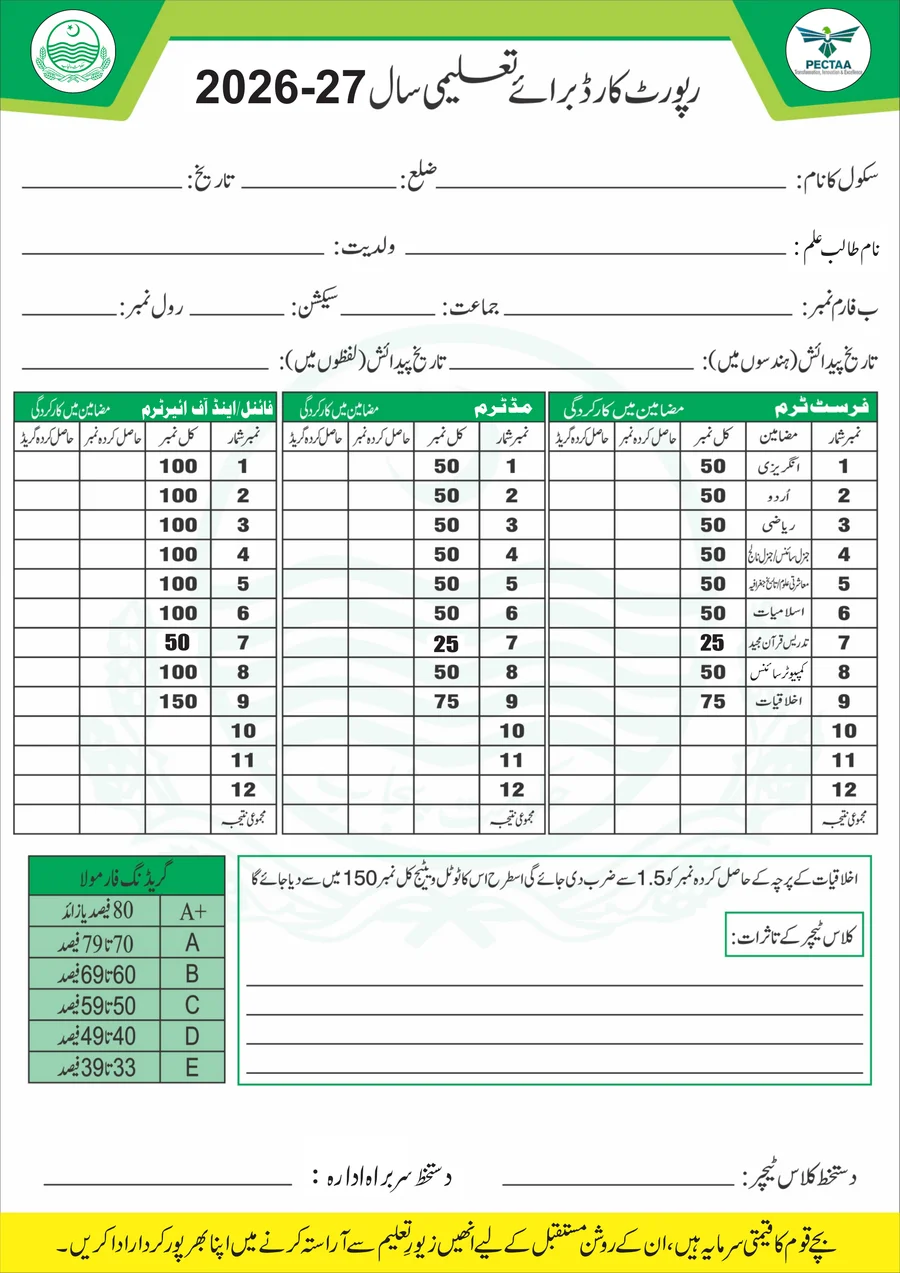
Explore the clean, intuitive interface teachers and school heads use to manage exams and print cards.
Built Specially for Both School Systems
Whether you manage a Government institution under Punjab SED or an independent Private Academy, the portal adapts instantly to your exact workflow.
Punjab SED & PEC Standards
Official SED Template- 1-Click SIS PDF Ingestion: Extracts students, B-Forms & rolls in 3 seconds
- Official 50-Mark Scheme: Pre-configured PEC passing marks and grading scale
- Three Exam Terms: Full support for First Term, Mid Term & Final exams
- Official Card Output: Authentic Punjab government crest and Urdu Nastaliq
Custom Assessment & Branding
Excel & 100-Mark Mode- Excel & CSV Roster Import: Auto-detects columns with sample template download
- 100 Marks vs 50 Marks Toggle: Instant scheme switch per class with auto-rescaling
- Custom Subjects: Add Computer, Drawing, Nazra Quran & GK with 1 click
- School Monogram: Upload institution logo and customize report header
Everything Your School Needs to Run Smooth Exams
Designed from the ground up to eliminate teacher stress and save hours of administrative paperwork.
Collaborative Multi-Teacher Entry
Urdu, Math, Science, and English teachers enter marks simultaneously from phones or laptops with cell-level autosave and complete teacher attribution.
Automatic Grades & Positions
No manual calculator needed. Percentages, letter grades (A+ to F), total obtained marks, and class position rankings are computed instantly.
2-Up Paper-Saver Batch Printing
Print two student cards side-by-side on each A4 sheet with dashed cut-guides to cut school paper and toner expenses by 50%.
Offline Queue & Instant Backup
Keep working through power cuts and spotty internet. Mutations queue safely on your device and sync to cloud on reconnect.
Ready to Modernize Your School's Examination Season?
Join educators and headmasters across Punjab creating error-free result cards in record time. No credit card required, works on any smartphone or PC.
School Name
Classes & Sections
Ready to Begin? Set Up Your First Class
Choose how you want to add students. Your roster, marks, and grades will automatically sync across all your teachers.
Drag & Drop Student Roster File Here
Upload Punjab SIS PDF, Excel (.xlsx, .csv), or paste directly from Microsoft Word to populate this class in seconds.
Enrolled Students Roster
| # | Photo | Roll No | Student Name | Father / Guardian Name | B-Form / Bay Form | Parent Mobile | Gender |
|---|
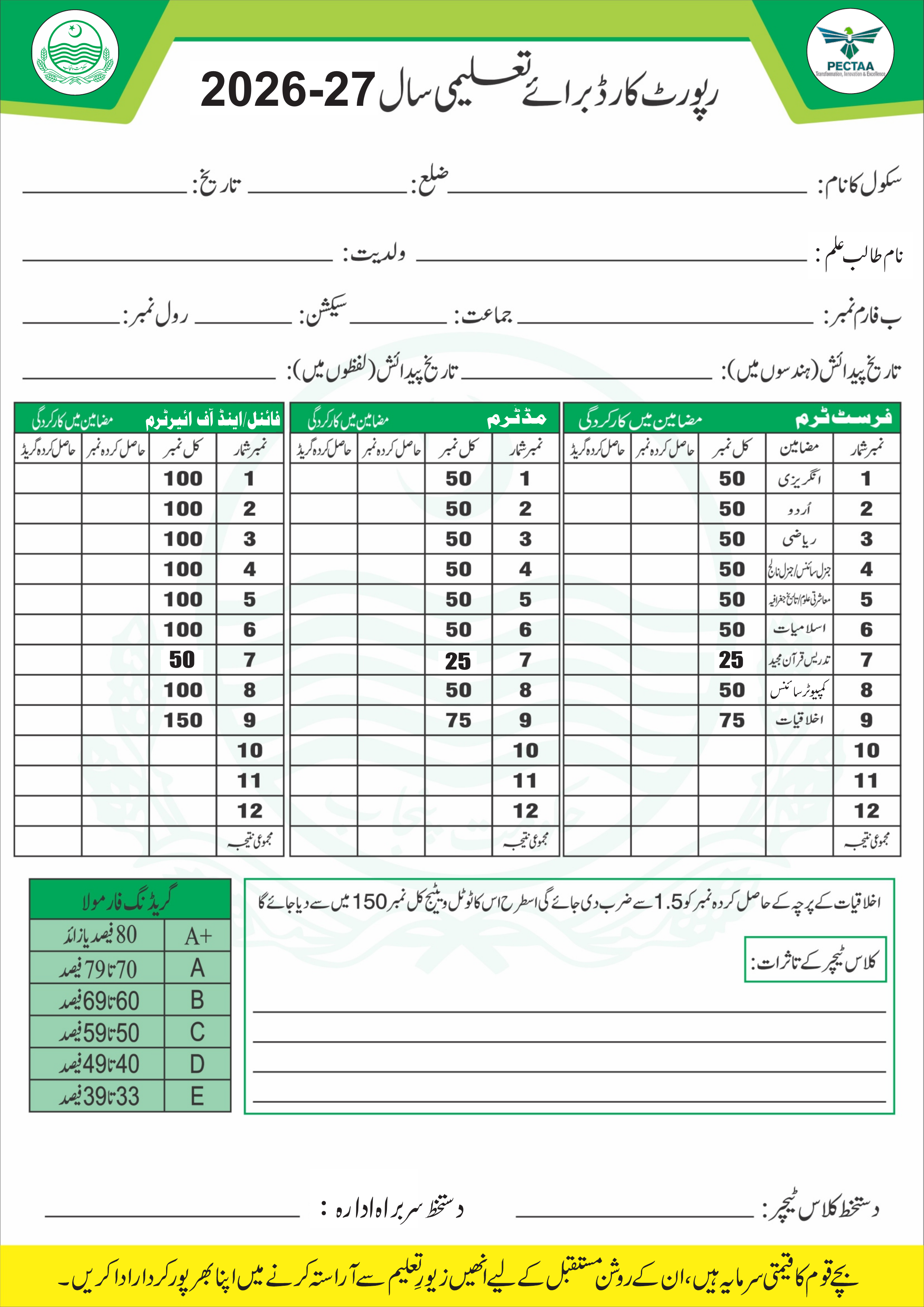
| # | Roll # | Student Name | Father / Guardian | English (50) | Urdu (50) | Math (50) | Science (50) | Social St. (50) | Islamiyat (50) | Nazra (25) | Computer (50) | Ethics (75) | Total Obt. | % | Grade | Status | ✕ |
|---|
Punjab SBA Result Cards Studio
Preview individual student cards, switch card templates, and print single or batch A4 result cards.
Displays in the card header and as a subtle watermark on all designs. Perfectly optimized for laser printers & photocopy machines.
No Student Selected for Preview
Pick a class with students to view their live result card preview.
School Workspace Settings
Manage school profile, monogram watermark, grading scale, card defaults, backups & subscription
-
Official School Monogram & Watermark
Overlaid onto all 9 result card templates and stamped as a high-clarity background watermark. Optimized for standard B&W photocopies and laser printers.
Authorized Digital Signatures & Official Rubber Stamp
Upload photos or scans of your handwritten pen signature and official school rubber stamp. Ink is automatically extracted and blended cleanly onto all 9 result card templates without any white background box.
Class Incharge / Teacher Signature
Pen signature for the left signature slot across all result cards.
Headmaster / Principal Stamp & Signature
Pen signature and official school rubber stamp (with EMIS & School name).
Official Rubber Stamp
Round school stamp, overlaid on the principal signature on the Govt. card. Upload a separate scan if your stamp isn't part of the signature image above.
Assessment & Maximum Marks Framework
Select the marks scale for subject columns, percentage computations, and report card evaluations.
50 Max Marks for major subjects and 25 Max Marks for Nazra Quran. Follows Punjab Examination Commission policy.
100 Max Marks for major subjects and 50 Max Marks for Nazra Quran. Tailored for private schools and academies.
A4 Page Printing Layout
Select default paper distribution when printing student result cards.
Center Background Watermark
Select the watermark text stamped behind student marks.
Teacher / Operator Identity
Set your name so marks entered or edited from this device are attributed to you in the immutable audit trail.
💾 Export Complete School Backup
Download a single timestamped JSON file containing all classes, student rosters, marks ledger, and term locks with a cryptographic seal.
🔄 Restore From Backup File
Restore all school classes and marks from an authentic SBA JSON backup. Validates school EMIS ownership before restoration.
School Subscription Plan
Your active license status and examination capabilities
Punjab SBA Pro License
Unlimited classes, all 9 result card designs, 2-up paper-saver printing, multi-teacher live sync, and one-click batch printing for the whole class.
Settings Calendar, style & signatures
Punjab School Education Department Official Stationery & Registers Studio
All official stationery, registers, and test books can be generated with pre-filled school details in authentic Nastaleeq Urdu. Select any register below to customize, review live A4 proofs, and print ready-to-bind official ledgers.
کارروائی برائے اجلاس سکول کونسل کمیٹی
| ایمس کوڈ: 31240469 | سکول کا نام: گورنمنٹ پرائمری سکول بستی جدید 117 ڈی بی | تحصیل: یزمان | ضلع: بہاول پور |
| یونین کونسل: چک 117 ڈی بی | مرکز: پل ٹیل والا (اے) | موضع: چک 117 ڈی بی | اراکین کی کل تعداد: 11 |
| اجلاس شروع کا وقت: 10:00 AM | اجلاس ختم ہونے کا وقت: 11:30 AM | تاریخ: 25-03-2026 | حاضر اراکین کی تعداد: 11 |
اجلاس میں موجود ممبران سکول کونسل کمیٹی
| نمبر شمار | نام | ولدیت / زوجیت | شناختی کارڈ نمبر | فون نمبر | عہدہ | دستخط / انگوٹھا |
|---|
رجسٹر شجرکاری مہم
گورنمنٹ پرائمری سکول بستی جدید، چک 117 ڈی بی
| نمبر شمار | تاریخ | پودے کا نام | تعداد | پودا لگانے والے کا نام | ریمارکس |
|---|
رجسٹر روزانہ صفائی و انسداد ڈینگی مہم
گورنمنٹ پرائمری سکول بستی جدید، چک 117 ڈی بی
| نمبر شمار | تاریخ و دن | معائنہ شدہ جگہ (چھت، واش رومز، کیاریاں، پانی ٹینکی) | لاروا / کھڑا پانی صورتحال | کی گئی کارروائی / سپرے | دستخط فوکل پرسن |
|---|
دفتر ہیڈ ماسٹر / انچارج ہیڈ ماسٹر
| حکم نامہ نمبر: OB-01/2026 | تاریخ اجراء: 25/03/2026ء | تعلیمی سیشن: 2025 تا 2026ء |
1. تمام اساتذہ کرام مقررہ وقت سے 15 منٹ قبل سکول تشریف لائیں اور صبح کی دعائیہ اسمبلی کا باقاعدہ و پُروقار انعقاد یقینی بنائیں۔
2. ہر استاد اپنے متعلقہ پیریڈ اور تفویض کردہ کلاس میں وقت کی پابندی کے ساتھ تدریسی فرائض، ہوم ورک چیکنگ اور ڈائری کا اندراج کریں۔
3. تفریح (Break) اور چھٹی کے وقت گیٹ اور گراؤنڈ پر نظم و ضبط قائم رکھنے کے لیے نامزد نگران اساتذہ اپنی موجودگی لازمی بنائیں۔
4. سیکیورٹی ایس او پیز، صاف پینے کے پانی کی فراہمی، اور کیمپس کی صفائی ستھرائی کی باقاعدہ روزانہ نگرانی کی جائے۔
| # | نام استاد مع عہدہ | تفویض کردہ ذمہ داری / ڈیوٹی کا شعبہ | اوقات کار / دن | دستخط برائے تعمیل |
|---|
رجسٹر آمد ڈاک و مراسلات
| نمبر شمار | تاریخ وصولی | مرسل کا نام مع دفتر / محکمہ | چٹھی نمبر و تاریخ | مضمون و خلاصہ مراسلہ | جس کے سپرد مع دستخط |
|---|
رجسٹر روانگی و ڈسپیچ ڈاک
| ڈسپیچ # | تاریخ روانگی | بنام مرسل الیہ مع پتہ و دفتر | عنوان / خلاصہ مراسلہ | ذریعہ ترسیل | وصولی دستخط / خرچ ڈاک |
|---|
لاگ بک برائے معائنہ افسران و مانیٹرنگ ٹیم
| نام معائنہ افسر مع عہدہ: ____________________________________ | تاریخ و وقت دورہ: 25/03/2026ء بوقت: 10:30 AM |
| سکول نام مع EMIS کوڈ: گورنمنٹ پرائمری سکول چک 117 ڈی بی (31205) | مرکز و تحصیل: پل ٹیل والا، تحصیل یزمان |
| طلبہ حاضری صورتحال: کل داخلہ: 120 حاضر: 114 غیر حاضر: 6 (95%) | سٹاف حاضری صورتحال: کل اساتذہ: 5 حاضر: 5 رخصت: 0 |
رجسٹر داخل خارج طلبہ (General Register — GR)
| داخلہ # | تاریخ داخلہ | نام طالب علم مع ولدیت | سرپرست مع پیشہ و رہائش | تاریخ پیدائش (ہندسوں میں) | تاریخ پیدائش (اردو الفاظ میں) | قومی شناختی ب فارم نمبر | قوم و مذہب | داخلہ کی جماعت | تاریخ اخراج | اخراج کی وجہ | دستخط ہیڈ ماسٹر |
|---|
رجسٹر آمد و رفت زائرین و سیکیورٹی چیک لاگ
| # | تاریخ | آنے والے کا نام مع ولدیت | شناختی کارڈ نمبر (CNIC) | فون نمبر | پتہ مع ادارہ / محکمہ | آمد کا مقصد / کس سے ملنا | وقت آمد | وقت روانگی | دستخط |
|---|
Letter Details
School name & EMIS fill automatically from your portal settings.
Choose Design
Letter Details
School name & EMIS fill automatically from your portal settings.
Check "Blank" to print bulk official copies for future handwritten dates.
Uses your portal logo by default.
Certificate Details Auto-saves
Teacher Credentials
Service & Experience
Signing Authority
Urdu Handwriting Practice Studio
Nastaleeq A4اردو نستعلیق خوشخطی ورک شیٹ جنریٹر • ۴ سطری گائیڈ لائنز
Teachers & Staff Management (اساتذہ کرام کا ریکارڈ)
Appointment letters, experience certificates, photo/signatures & customizable staff records.
| Photo | Teacher Info & Father Name | Designation / Role | CNIC & Mobile | Appointment Date | Status | Official Letters & Actions |
|---|
No Teacher Records Found
Click below to record your first teacher with complete appointment details, photo and signature.
GOVERNMENT OF THE PUNJAB · SCHOOL EDUCATION DEPARTMENT
PUNJAB SCHOOL BASED ASSESSMENT (SBA)
تصویر طالب علم Upload
| # | Subject / مضامین | Total / کل | Obtained / حاصل کردہ | Percentage / فیصد | Grade / گریڈ | Evaluation / کارکردگی |
|---|---|---|---|---|---|---|
| Grand Total / میزان کل نمبرات | 0 | 0 | 0.0% | - | - | |
🌟 Outstanding superstar! Shows wonderful effort and excellent learning. Keep shining bright! 🏆🎉
GOVERNMENT OF THE PUNJAB · SCHOOL EDUCATION DEPARTMENT
PUNJAB SCHOOL BASED ASSESSMENT (SBA)
| Student Name / نام طالب علم: | - | Father's Name / ولدیت: | - |
|---|---|---|---|
| Class & Section / جماعت و سیکشن: | - | Roll Number / رول نمبر: | - |
| B-Form No. / فارم-بی نمبر: | - | Issue Date / تاریخ اجرا: | - |
| Attendance / کل حاضری: | - Days (-%) | Assessment Term / امتحان: | First Term |
| Sr.# | Subject / مضمون | Total Marks | Obtained Marks | Percentage | Grade | Remarks / کیفیت |
|---|---|---|---|---|---|---|
| Grand Total / میزان کل | 0 | 0 | 0.0% | - | - | |
GOVERNMENT OF THE PUNJAB · SCHOOL EDUCATION DEPARTMENT
PUNJAB SCHOOL BASED ASSESSMENT (SBA)
| # | Subject / مضمون | Max Marks | Obtained | Percentage | Grade | Performance |
|---|---|---|---|---|---|---|
| Comprehensive Grand Total | 0 | 0 | 0.0% | - | - | |
🌟 Outstanding superstar! Shows wonderful effort and excellent learning. Keep shining bright! 🏆🎉
PUNJAB EDUCATION FOUNDATION (PEF)
PARTNER SCHOOL ASSESSMENT CARD
PARTNER
| Student Name / نام طالب علم: | - | Father's Name / ولدیت: | - |
|---|---|---|---|
| Class & Section / جماعت و سیکشن: | - | Roll Number / رول نمبر: | - |
| B-Form No. / فارم-بی نمبر: | - | Issue Date / تاریخ اجرا: | - |
| Attendance / کل حاضری: | - Days (-%) | Assessment Term / امتحان: | First Term |
| Sr.# | Subject / مضمون | Total Marks | Obtained Marks | Percentage | Grade | Remarks / کیفیت |
|---|---|---|---|---|---|---|
| Grand Total / میزان کل | 0 | 0 | 0.0% | - | - | |
بِسْمِ اللَّهِ الرَّحْمَٰنِ الرَّحِيمِ
حکومت پنجاب · محکمہ تعلیم سکولز
NOOR ISLAMIC RESULT CARD
نور اسلامی رزلٹ کارڈ و تعلیمی کارکردگی رپورٹ
| نام طالب علم / Student Name: | - | ولدیت / Father's Name: | - |
|---|---|---|---|
| جماعت و سیکشن / Class & Section: | - | رول نمبر / Roll Number: | - |
| فارم-بی نمبر / B-Form No.: | - | تاریخ اجرا / Issue Date: | - |
| کل حاضری / Attendance: | - Days (-%) | امتحان / Assessment Term: | First Term |
| نمبر شمار | مضمون / Subject | کل نمبر | حاصل کردہ نمبر | فیصد | گریڈ | کیفیت |
|---|---|---|---|---|---|---|
| میزان کل / Grand Total | 0 | 0 | 0.0% | - | - | |
GOVT. OF THE PUNJAB · SCHOOL EDUCATION DEPARTMENT
STUDENT RESULT CARD
School Name
STUDENT RESULT CARD (PHOTOCOPY) رزلٹ کارڈ
| Student Name: | - | Father's Name: | - |
|---|---|---|---|
| Class & Section: | - | Roll No: | - |
| B-Form No: | - | Date: | - |
| Attendance: | - (-%) | Grade Scale: | A+ 80+ · A 70+ · B 60+ · C 50+ · D 40+ · F <40 |
| # | Subject | Total | Obtained | % | Grade | Status |
|---|---|---|---|---|---|---|
| GRAND TOTAL | 0 | 0 | 0.0% | - | - | |
JUNIOR WING · PLAY · LEARN · SHINE
My Little Stars Progress Card
School Name
| ⭐ Star Name: | - | 👨 Father's Name: | - |
|---|---|---|---|
| 🏫 Class: | - | 🔢 Roll No: | - |
| 📅 Date: | - | ✅ Attendance: | - days (-%) |
| # | My Subjects | Total | My Marks | % | Stars | Smile |
|---|---|---|---|---|---|---|
| 🌟 Total Stars | 0 | 0 | 0.0% | - | - | |
💬 Teacher Says… / استاد کی رائے
-
GOVERNMENT OF THE PUNJAB · SCHOOL EDUCATION DEPARTMENT
ANNUAL RESULT GAZETTE
سالانہ رزلٹ گزٹ · سرکاری اعلان نتائج
School Name
ANNUAL RESULT GAZETTE سالانہ رزلٹ گزٹ
| Name of Student: | - | Father's Name: | - |
|---|---|---|---|
| Class / Section: | - | Roll Number: | - |
| B-Form No: | - | Date of Declaration: | - |
| Attendance: | - Days (-%) | Examination: | Final Term |
| Sr. | Subject | Max. Marks | Marks Obtained | Percentage | Grade | Result |
|---|---|---|---|---|---|---|
| GRAND TOTAL | 0 | 0 | 0.0% | - | - | |